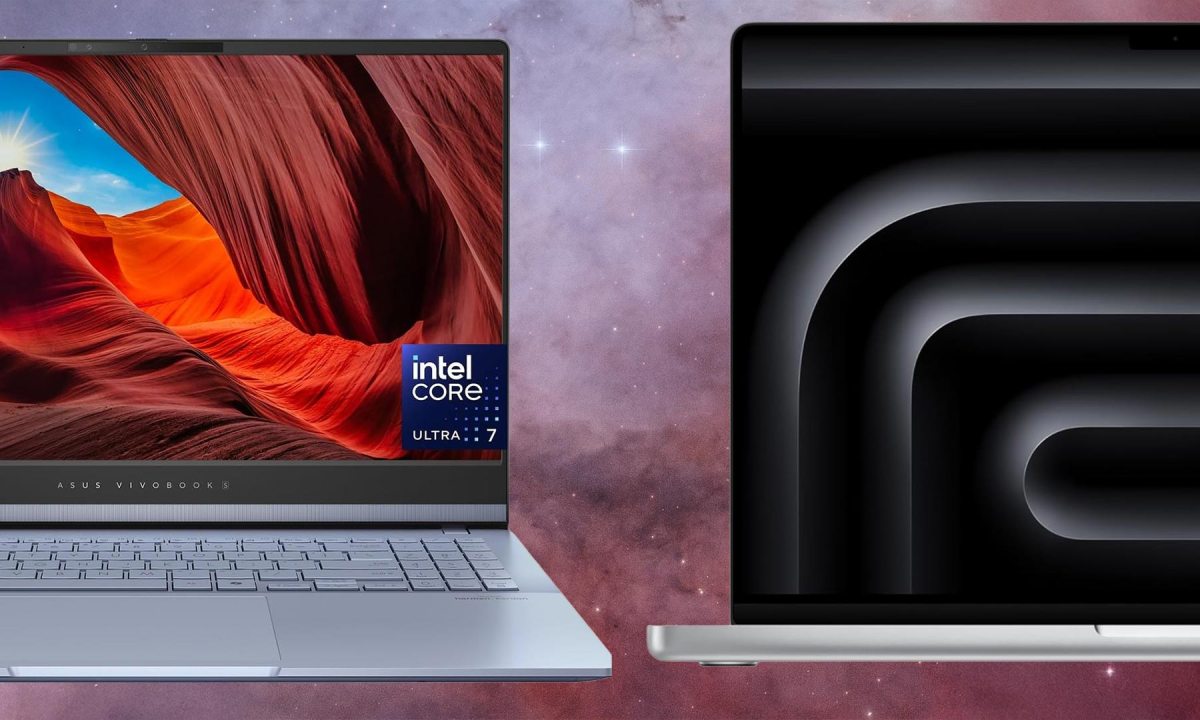
Small-screen laptops are easy to lug around, but the screens can feel cramped, especially when there are so many great 15-inch models out there on the market. The term “15-inch laptop” has evolved in recent years, with screens shifting in aspect ratio and 16-inch models occupying the same size chassis that used to encompass 15-inch screens. We’ve chosen the Apple MacBook Air 15-inch (M4) as our best overall pick, but the Apple ecosystem isn’t for everyone. There are options out there for every usage and budget, so check out the full list to find the perfect machine.
How we chose the best 15-inch laptops
A laptop is a personal choice, and most of the PopSci staff spend our days staring at them. For this buying guide, we’ve based our picks on a wide selection of variables, including extensive hands-on testing, user feedback, in-depth spec comparisons, editorial reviews, and brand reputation. We don’t typically rely on hardcore benchmarking tests and charts, but rather real-world experience and performance.
The best 15-inch laptops: Reviews & Recommendations
Below are our current top picks, updated with newer models and more search-relevant categories—so whether you’re buying for school, work, gaming, or creative production, you can quickly land on the right kind of machine.
Best overall
Apple MacBook Air 15-inch (M4)
Check price on Amazon
Pros
- Excellent performance in a thin, fanless design
- Big, sharp 15.3-inch display in a truly portable body
- Strong battery life for work/school travel days
Cons
- Limited ports without a hub
- Base storage is still tight if you keep lots of media locally
Specs
-
Display:
15.3-inch Liquid Retina (16:10) -
Processor:
Apple M4 -
Memory:
16GB (base; configurable higher) -
Storage:
256GB (base; configurable higher) -
Ports:
2x Thunderbolt/USB4 + MagSafe + headphone jack
The 15-inch MacBook Air stays impressively light for the screen size, the M4 chip has more than enough headroom for everyday work, and the fanless design means it stays quiet even when you’re multitasking hard. It’s the kind of machine that will last for years, even if you use it for serious work.
The 15.3-inch display is big enough to make split-screen work feel normal, not cramped. And while the Air isn’t a dedicated workstation, it’s capable enough for photo editing, light video work, and creative apps. It feels just like a familiar MacBook Air, but with more screen real estate to get work done. It’s a fantastic all-around machine for most people.
Best for gaming
ASUS ROG Zephyrus G16 (2025)
Check price on Amazon
Pros
- Powerful GPU options in a surprisingly portable chassis
- Excellent OLED panel with fast refresh for gaming and creator work
- Good port selection for a thin performance laptop
Cons
- Battery life drops fast when you’re actually gaming
- Fans can get loud under sustained load
Specs (typical configs)
-
Display:
16-inch OLED, high refresh (varies by config) -
Processor:
Intel Core Ultra (varies by config) -
Graphics:
NVIDIA GeForce RTX (varies by config) -
Memory:
16GB–32GB (common) -
Storage:
1TB SSD (common)
Some gaming laptops make it feel like you’re carrying a patio stone around in your backpack. The Zephyrus G16 is one of the few that manages to legitimate gaming performance without excessive weight or bulk. That matters if you’re commuting, traveling, or just moving between rooms and not trying to drag a 7-pound space heater around.
Many creatives use gaming machines for editing tasks, and this machine will do just fine in that regard. Choose a flavor of NVIDIA RTX graphics card for your specific needs. Just keep expectations realistic: like most thin performance laptops, it can get loud and battery life depends heavily on what you’re doing.
Best touchscreen
HP Spectre x360 16
Check price on Amazon
Pros
- Large, responsive touchscreen with 2-in-1 flexibility
- Premium build and strong speakers/webcam for meetings
- Great for note-taking, sketching, and media
Cons
- Heavier than most non-convertible laptops
- Price climbs quickly with higher-end configs
Specs (typical configs)
-
Display:
16-inch touchscreen (OLED options common) -
Processor:
Intel Core Ultra (varies by config) -
Memory:
16GB (common) -
Storage:
512GB–1TB SSD (common) -
Form factor:
360-degree hinge (laptop/tent/tablet modes)
The Spectre x360 16 takes a thoughful approach to touchscreens. If you take notes, sketch, mark up PDFs, or just want the flexibility of flipping the screen into tent mode for streaming, this is one of the cleanest implementations in a big-screen laptop.
It’s a genuine productivity machine in either configuration.The burly chassis makes room for a comfortable keyboard, good audio, and the kind of webcam/mic setup that makes remote meetings slightly less miserable. The tradeoff is weight: 2-in-1s are rarely the lightest option in any size class.
Best under $1,000
ASUS Vivobook S 15 OLED
Check price on Amazon
Pros
- OLED screen that makes everyday work and streaming look better
- Solid performance for the price in common configs
- Good “all-rounder” pick for school and home office use
Cons
- Specs vary a lot by listing—double-check RAM/storage before buying
- Not a dedicated creator/gaming machine
Specs (common target)
-
Display:
15.6-inch OLED (often 2.8K/3K, varies) -
Processor:
Intel Core Ultra (varies by config) -
Memory:
16GB (recommended) -
Storage:
512GB–1TB SSD (recommended)
The Vivobook S 15 OLED is a lot of machine for under a G. You get a large, OLED screen that looks legitimately good, plus enough performance for everyday work, school, and light creative tasks. The Intel Core Ultra options provide enough power and flexibility for any task depending on how much you want to spend.
The main thing to watch is configuration creep. Listings can vary wildly (RAM and storage in particular), so treat the name as a starting point and make sure you’re buying something with at least 16GB of memory if you want it to stay snappy long-term.
Best budget
Acer Aspire Go 15
Check price on Amazon
Pros
- Affordable, big-screen everyday laptop
- Good enough for browsing, docs, email, streaming, and school portals
- Often available in sensible 16GB/512GB configurations
Cons
- Not meant for heavy video editing or modern AAA gaming
- Build and screen quality vary by budget model—manage expectations
Specs (varies by config)
-
Display:
15.3-inch WUXGA (1920×1200) in common listings -
Processor:
Intel Core i5-class (varies by config) -
Memory:
8GB–16GB (aim for 16GB if you can) -
Storage:
256GB–512GB SSD (512GB preferred)
When shopping for a budget laptop, it’s crucial to manage expectations. The Aspire Go 15 is here for realistic needs: web, docs, streaming, school systems, and general daily computing. If that’s your life, you don’t need a monster GPU—you need something stable, with a screen that doesn’t feel tiny and specs that won’t choke on 40 browser tabs.
As always, prioritize memory and storage over flashy extras. A model with 16GB of RAM and a 512GB SSD will feel dramatically better over time than a cheaper config that forces you into constant tab triage.
Best for college
Lenovo Yoga 7i 16 (2-in-1)
Check price on Amazon
Pros
- 2-in-1 flexibility for note-taking, reading, and presentations
- Big 16:10 screen is great for writing and research
- Solid everyday performance and a comfortable keyboard
Cons
- Bigger and heavier than a typical 13–14-inch student laptop
- Integrated graphics limits serious gaming/3D work
Specs (as commonly listed)
-
Display:
16-inch 16:10 touchscreen (often 1920×1200) -
Processor:
Intel Core Ultra 7 (common configs) -
Memory:
16GB (common) -
Storage:
1TB SSD (common) -
Form factor:
360-degree hinge (laptop/tent/tablet)
The Yoga 7i 16 is a great campus pick if you want one device that can behave like a laptop and a big-screen tablet—especially for reading and annotating. The larger 16:10 screen is particularly useful for students because you can see more vertical content (documents, PDFs, web pages) without constant scrolling. The tradeoff is portability. If you’re walking across campus all day, a smaller laptop is easier—but if you mostly bounce between dorm, library, and class, the extra screen space is worth it.
Best for work
Lenovo ThinkPad T16 Gen 3
Check price on Amazon
Pros
- Excellent keyboard and “work all day” ergonomics
- Business-focused durability and serviceability
- Useful ports for docks, projectors, and peripherals
Cons
- Design is more practical than pretty
- Not built for heavy gaming or GPU-intensive creative work
Specs (varies by config)
-
Display:
16-inch 16:10 (WUXGA common) -
Processor:
Intel Core Ultra (common configs) -
Memory:
16GB+ recommended for long-term use -
Security:
Business-grade options (varies by config)
The ThinkPad has been the quintessential work laptop for decades. The T16 line is built around the components that matters when your laptop is part of your job: a great keyboard, a practical port selection, and a durable chassis that can withstand the rigors of a daily commute. This is also the pick for people who live in spreadsheets, dashboards, and browsers all day and just want the machine to keep up without drama. It’s not the flashiest option on the list, but it’s one of the most sensible.
Best for photo and video editing
Apple MacBook Pro 16-inch (M4 Pro)
Check price on Amazon
Pros
- Sustained performance for heavy creative workloads
- Excellent Liquid Retina XDR display for color and HDR work
- Strong battery life for a true high-end laptop
Cons
- Expensive once you spec it for serious production
- Overkill if you only do occasional edits
Specs (M4 Pro class)
-
Display:
16.2-inch Liquid Retina XDR -
Processor:
Apple M4 Pro -
Graphics:
Integrated Apple GPU + pro media engines -
Memory:
24GB+ recommended for pro apps -
Ports:
HDMI + SDXC + multiple Thunderbolt (varies by model)
The 16-inch MacBook Pro with an M4 Pro-class chip is slightly larger and more expensive than other models on the list, but those small compromises are worth it in the name of performance. That’s especially true if you’re editing photos and videos on a daily basis. I work in Lightroom Classic all the time and edit video in Final Cut Pro X, which makes this a more logical option for an all-in-one machine.
Beyond performance, the screen sets a standard. Apple’s Liquid Retina XDR panel is a strong fit for color-critical work and HDR workflows, and the port selection (including SD card support) is legitimately useful for camera shooters. It’s expensive, but if you’re doing paid work, time saved is the real spec.
What to consider when selecting one of the best 15-inch laptops
Screen size is only the beginning. In this class, the “best” laptop is usually the one with the right balance of performance, battery life, display quality, and ports for your specific workload.
Processor
Most current laptops you’ll see fall into a few buckets: Apple’s M-series chips (now including M4 models), Intel’s Core Ultra chips, and AMD’s Ryzen laptop processors. A newer CPU generally means better efficiency (battery life), better integrated graphics, and often better “AI” hardware (an NPU) for features like background blur, voice cleanup, and some on-device tasks. If your work is mostly browser + Office-style apps, you don’t need the fastest chip—just avoid ultra-low-end configs and prioritize memory.
Graphics
Integrated graphics are fine for everyday work, streaming, and light creative tasks. If you game seriously or work in GPU-heavy apps (3D, effects-heavy video, some AI workflows), you’ll want a laptop with a dedicated NVIDIA GPU. Those machines cost more and usually run louder and hotter, but they deliver far better performance for the right tasks.
Memory
For most people, 16GB of RAM is the new “safe minimum” if you want a laptop to stay fast for years. Eight gigabytes can work for light use, but it’s easier to hit the ceiling today with modern browsers, meeting apps, and larger files. Many laptops aren’t upgradeable after purchase, so buy the memory you’ll need now.
Display
In 15–16-inch laptops, 16:10 screens (taller than the older 16:9 standard) are increasingly common, and they’re great for productivity because you see more content vertically. OLED panels deliver deep blacks and punchy contrast, which is excellent for movies and creative work—but they can vary in brightness and glossiness, so consider where you work (bright office? coffee shop window seat?) before you commit.
Storage
A 256GB SSD can work if you live in the cloud, but it fills quickly with photos, video, and big apps. For most buyers, 512GB is the practical baseline. If you do creative work, consider 1TB—especially if you don’t want external drives permanently attached to your life.
Connectivity
USB-C is the default now, and higher-end models often support Thunderbolt/USB4 for fast docks and external displays. If you regularly connect to projectors, monitors, SD cards, or legacy accessories, prioritize laptops with the ports you actually use. A dongle can solve a lot, but it’s one more thing to forget at home.
FAQs
Q: Is 15 inches too big for a laptop?
Not necessarily. A 15-inch (or 16-inch) laptop is often the best compromise between portability and usability. You get more screen space for multitasking and a roomier keyboard, but you’ll carry a bit more weight and a larger chassis. If you commute daily or travel constantly, a smaller laptop may be easier. If you work at desks most of the time, the larger screen is usually worth it.
Q: Are 15-inch laptops good for photo and video editing?
Yes—if you choose the right specs. For photo work, prioritize a good display and enough RAM (16GB minimum, more if you work with large files). For video, CPU power and storage matter, and a dedicated GPU can help depending on your editing software and effects. If editing is your job, consider a creator-focused laptop like a MacBook Pro or a Windows model with a dedicated NVIDIA GPU.
Q: Are 15-inch laptops good for gaming?
They can be excellent. Most gaming laptops land in the 15–16-inch range because it balances screen size with portability. The key is choosing a model with a dedicated GPU and adequate cooling. Just know that thinner gaming laptops can get loud under load, and battery life while gaming is usually limited.
Q: Can you bring a 15-inch laptop on a plane?
Yes, you can bring a 15-inch laptop onto a plane in your carry-on luggage. Tray tables can be tight, but most standard seats can accommodate a laptop in this size range. A padded sleeve is a smart idea if you’re packing it with other gear.
Final thoughts on the best 15-inch laptops
If you want one high-confidence pick, the MacBook Air 15-inch (M4) is still the best blend of screen size, portability, and real-world speed for most people. From there, it’s about matching the laptop to your life: a Zephyrus G16 if games (and GPU work) matter, a Spectre x360 if you’ll actually use touch/pen features, a ThinkPad T16 if this laptop is basically your office, and a MacBook Pro if you’re editing photos and video for real. In the 15–16-inch class, the best laptop isn’t the one with the biggest numbers—it’s the one that stays fast, comfortable, and reliable in the work you do every day.

2025 PopSci Best of What’s New
Gear,Computers,Gaming,Home,Laptops,PC GamingCommerce,evergreen,nota,reviews,roundup#15inch #laptops #Popular #Science1770955487