Key Highlights
- Opera has launched Opera One R3, the third major iteration of its flagship browser, introducing a re-engineered “agentic” AI engine and expanded multitasking layouts.
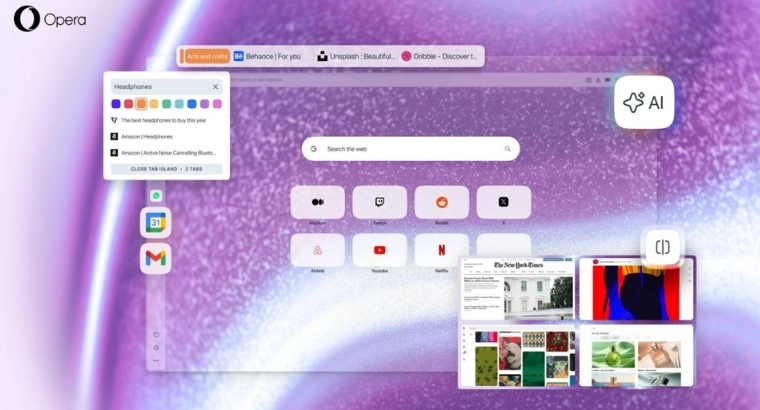
- In this new update, the Chinese browser company has added AI contextual awareness, allowing the browser to provide responses based specifically on individual tabs or “Tab Islands,” alongside a new feature for analyzing and navigating YouTube videos.
- New productivity features include a quad-tab split-screen mode, a revamped “Early Bird” beta access toggle, and the integration of Gmail and Google Calendar into the modular sidebar.
What’s Really New in One R3?
Opera has just released One R3 on Thursday, with new AI features & redesign to its flagship browser. The update focuses on “agentic” AI capabilities and a modular interface designed to streamline complex browsing sessions.
The release marks the third annual “rebirth” of the Opera One platform. With this update, Opera focuses to shift towards an AI centric browser built on top of the Opera Neon browser. The company claims the new system provides 20% faster response times compared to previous versions.
Contextual AI and YouTube Integration
The updated AI now operates with contextual awareness, meaning it can limit its data processing to the active tab or a specific “Tab Island,” which is Opera’s automated tab-grouping feature. Users can toggle this context-specific mode on or off within the chat interface.
The One R3 also comes with a new tool for video content which allows users to use AI and analyze YouTube videos. With this browser can summarize topics discussed in long-form content and help assist to locate specific timestamps or moments within a video.
UI Overhaul and Multitasking Layouts
The new revamped browser also comes with major upgrade to manage multiple windows. The Opera One R3 can split-screen with upto four tabs at the same time, which was earlier restricted to two (much like in Chrome). These can be arranged in various configurations, including grid and horizontal layouts, to accommodate high-resolution monitors and laptop screens.
The company is also shifting its development cycle by replacing its separate beta browser builds with an “Early Bird” mode. Users can now toggle this setting within the standard browser to test upcoming features, such as the new quad-split screen, without installing a secondary application.
Modular Design and Custom Themes
The browser’s modular sidebar, which houses shortcuts to messengers and music players, now includes native integrations for Gmail and Google Calendar. This addition aims to reduce tab switching for users relying on Google’s productivity suite.
The update also includes three new “dynamic” themes:
- Radiance: A dark-mode theme featuring the R3 signature sphere.
- Orbit: A light-mode alternative to Radiance.
- Sonic: Developed in collaboration with Spotify, this theme features a background that reacts visually to music played through the browser’s integrated player.
“We’re giving you the best browser to work with as many AI tools, websites and services, all within a beautiful visual and auditory experience,” said Mohamed Salah, senior director of product at Opera, in a statement accompanying the release.
AI News#Opera #Launched #Focused #Features #Learn1768475900

Recent Post



Gallery






Featured Videos